Blog
Apr 24, 2026
Home Health AI Buyer's Guide: 7 Questions to Ask Before You Sign

Arvind Sarin, CEO & Chairman of Copper Digital

We talk to agency owners and directors of nursing every week who are in the middle of evaluating AI tools and feeling overwhelmed by the options. The demos all look impressive. The sales decks all show dramatic time savings. Every vendor claims to be built specifically for home health. But when you sit down and try to compare them side by side, the differences between a tool that will actually work in your agency and a tool that will collect dust after 90 days are hidden in the details that nobody covers during the sales call.
This guide is the set of questions we wish every agency asked before signing a contract. We wrote it because we have seen what happens when agencies buy the wrong tool: the nurses resist it, the IT team cannot integrate it, the billing team does not see the impact they were promised, and 12 months later the agency is back where it started with less budget and more skepticism. These seven questions will not make the decision for you, but they will expose the gaps that vendors would rather you did not find until after you have signed.
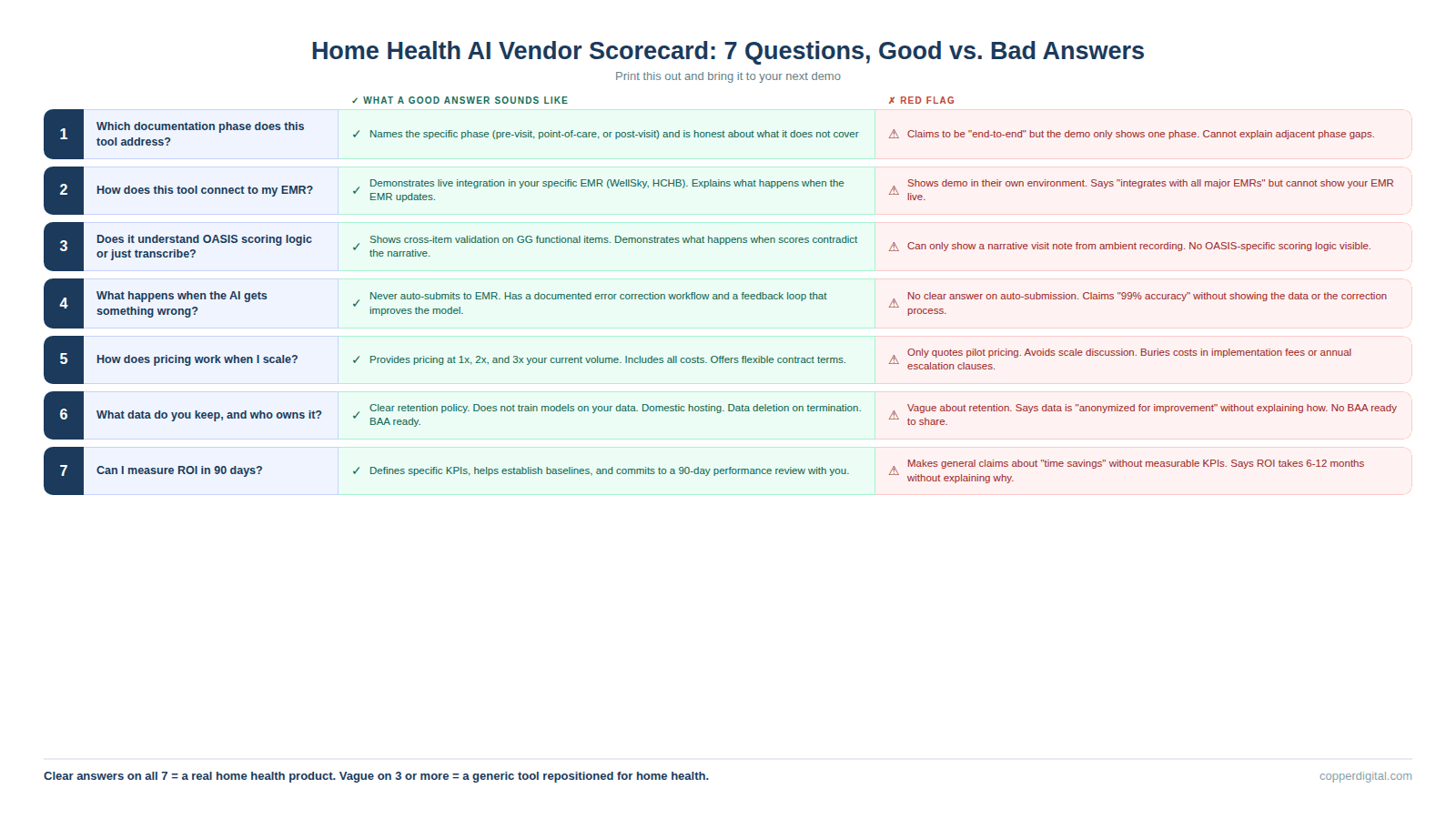
Question 1: Which Documentation Phase Does This Tool Actually Address?
Documentation in home health has three phases: the pre-visit phase where the chart gets prepared before the nurse leaves the office, the point-of-care phase where she is in the home doing the assessment, and the post-visit phase where QA reviews the chart before billing. Most AI tools on the market today address only one of those three phases. Ambient scribes handle point-of-care. Chart review platforms handle post-visit. Pre-visit automation handles intake and chart preparation. Understanding which phase a tool covers is the first and most important filter because it tells you exactly what problem the tool solves and, more importantly, what problems it does not.
Good answer: The vendor can name the specific phase, explain what data flows in and out, and tell you which problems in adjacent phases their tool does not address. They are honest about scope.
Bad answer: The vendor says they handle everything, or they describe their tool as an end-to-end platform without being able to explain exactly what happens at each phase. If the demo only shows the point-of-care experience and never addresses what happens before or after the visit, the tool is a scribe, not a workflow.
Question 2: How Does This Tool Connect to My EMR?
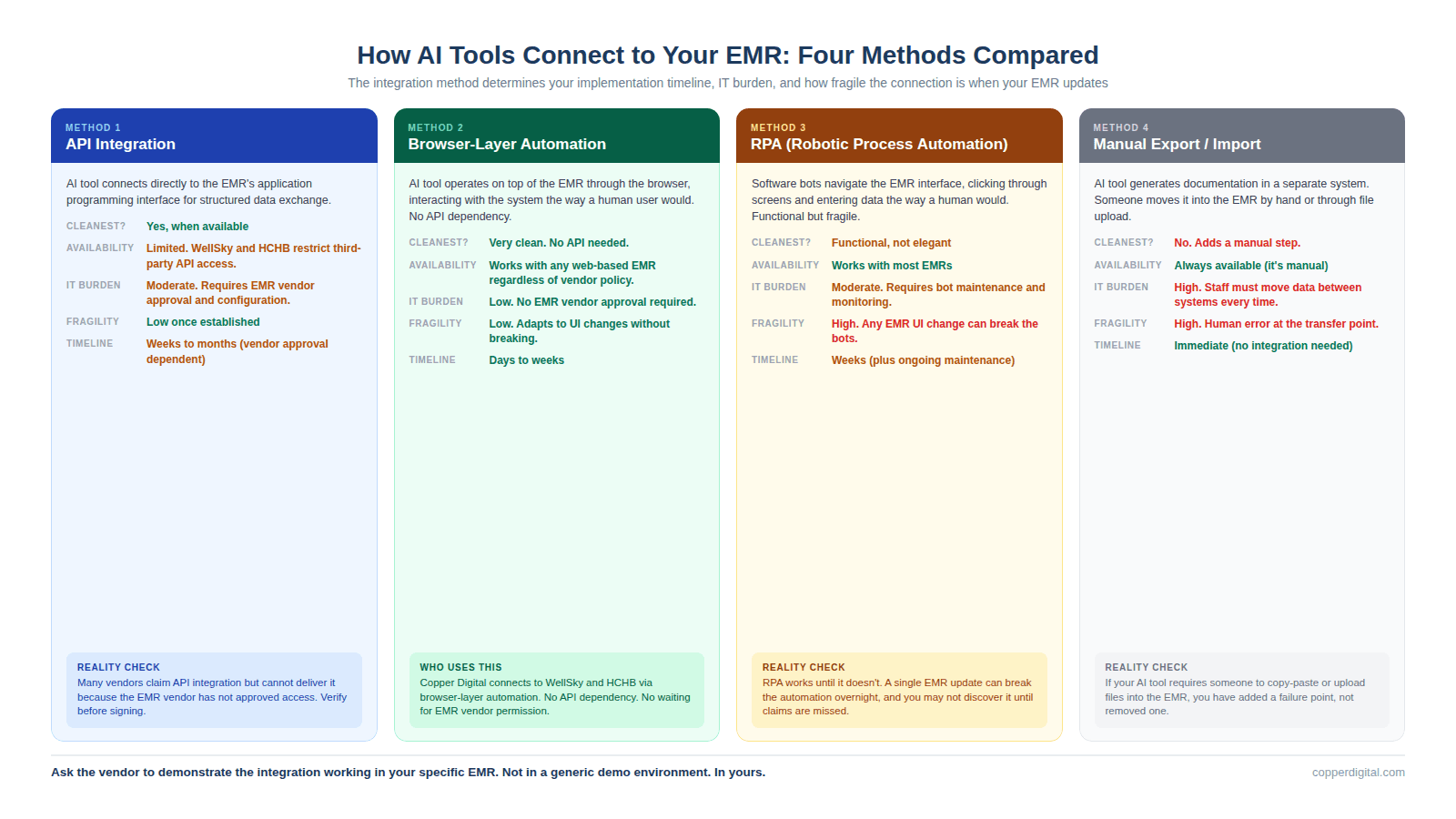
This is where more deals fall apart post-signature than any other question. The integration method determines your implementation timeline, your IT burden, your ongoing maintenance cost, and how fragile the connection is when your EMR vendor pushes an update. There are four common integration methods in the home health AI market right now, and they have very different implications.
API integration means the AI tool connects directly to your EMR's application programming interface. This is the cleanest method when it is available, but WellSky and Homecare Homebase have historically limited third-party API access, which means many vendors cannot offer true API integration even if they claim to. Browser-layer automation means the AI tool operates on top of your EMR through the browser, mimicking how a human user would interact with the system. This is how Copper Digital works, and it means no API dependency, no waiting for EMR vendor approval, and no risk of the integration breaking when the EMR updates. RPA (robotic process automation) means the tool uses bots to navigate the EMR interface. This works but is brittle because any change to the EMR's user interface can break the automation. Manual export and import means the tool generates documentation in a separate system and then someone has to move it into the EMR by hand or through a file upload. This adds a step and a failure point.
Good answer: The vendor can demonstrate the integration working in your specific EMR (not a generic demo environment), explain what happens when the EMR updates, and tell you the average implementation timeline for agencies on your platform.
Bad answer: The vendor shows the demo in their own environment, says they integrate with all major EMRs, but cannot show you a live connection to WellSky or HCHB. Or the integration depends on an API that requires EMR vendor approval, and nobody has confirmed that approval will be granted.
Question 3: Does This Tool Understand OASIS Scoring Logic, or Does It Just Transcribe?
This is the question that separates home health specific tools from generic ambient scribes wearing a home health label. A transcription tool captures what the clinician says and maps keywords to documentation fields. A reasoning tool understands the scoring logic behind OASIS items, cross-references related items for consistency, and flags when a score does not align with the documented clinical picture.
The difference matters because OASIS inconsistencies are the top trigger for ADRs and claim denials. If your GG0170 mobility score says the patient is moderately impaired but your visit notes describe someone who cannot get out of bed, a transcription tool will not catch that. A reasoning tool will flag it before the chart reaches QA. Ask the vendor to show you a specific example of how their tool handles a GG functional item, and whether it checks that score against related items like fall history, lower extremity strength, and pain level.
Good answer: The vendor can show a live example of cross-item validation, explain which OASIS sections their AI covers, and demonstrate what happens when the clinician's narrative contradicts the scoring.
Bad answer: The vendor says they handle OASIS but can only show you a narrative visit note generated from ambient recording. If they cannot show OASIS-specific scoring logic, they are a SOAP note scribe with OASIS templates, not an OASIS automation tool.
Question 4: What Happens When the AI Gets Something Wrong?
Every AI tool will make mistakes. The question is not whether errors occur but how the system handles them when they do. You need to understand three things: whether the AI auto-submits to the EMR or requires human review before submission, what the correction workflow looks like when a clinician identifies an error, and whether errors are logged and used to improve the system over time.
At Copper Digital, we never auto-submit to the EMR. Every AI-generated output is reviewed by a clinician before it reaches the patient record. We have a team of clinical reviewers who hold daily calls with our engineering team to flag errors, identify patterns, and feed corrections back into the system. That feedback loop is how the AI improves. If a vendor's tool auto-submits documentation to the EMR without human review, that is a compliance risk and a liability question your legal team needs to evaluate before you sign.
Good answer: The vendor has a documented error handling process, can show you how clinicians flag and correct AI output, and has a feedback loop where corrections improve the model. They never auto-submit to the EMR.
Bad answer: The vendor does not have a clear answer on auto-submission, cannot explain their error correction process, or tells you the AI is 99% accurate without showing you the data behind that claim.
Question 5: How Does Pricing Work When I Scale?
Most AI vendors offer attractive introductory pricing for pilots. The question is what happens when you go from 10 nurses to 50, or from one location to five. Some tools price per user per month, which scales linearly with your workforce. Some price per visit or per episode, which scales with your patient volume. Some charge flat platform fees with usage tiers. And some have hidden costs for API calls, storage, or premium features that only surface after you have committed.
Ask the vendor to model pricing at your current volume, at double your current volume, and at triple your current volume. If the cost per nurse or cost per episode changes dramatically at scale, you need to understand that before you commit. Also ask about contract length and termination terms. A 36-month contract with a 12-month early termination penalty is a very different commitment than a month-to-month agreement with 60-day notice.
Good answer: The vendor provides a clear pricing model at multiple scales, includes all costs (implementation, training, support, API usage), and offers contract terms that let you exit if the tool does not deliver.
Bad answer: The vendor quotes pilot pricing only, avoids discussing scale pricing, or buries significant costs in implementation fees, per-call charges, or annual escalation clauses.
Question 6: What Data Do You Keep, and Who Owns It?
This question matters more than most agencies realize during the evaluation process. When an AI tool processes your clinical documentation, it is ingesting protected health information. You need to understand where that data is stored, how long it is retained, whether it is used to train the vendor's models for other customers, and what happens to your data if you terminate the contract.
HIPAA requires a Business Associate Agreement, which every legitimate vendor will have. But a BAA is the floor, not the ceiling. Ask whether your patient data is used in aggregate to train models that serve other agencies. Ask whether transcripts or recordings are stored and for how long. Ask whether you can request deletion of all your data upon contract termination. And ask where the data is physically hosted, because some vendors use offshore processing that may create compliance complications.
Good answer: The vendor has a clear data retention policy, does not use your patient data to train models for competitors, stores data domestically, and provides for data deletion upon termination. The BAA is already drafted and available for review.
Bad answer: The vendor is vague about data retention, says patient data is anonymized and used for model improvement without explaining how anonymization works, or does not have a BAA ready to share during the evaluation process.
Question 7: Can I Measure ROI in the First 90 Days?
The most important question for last. If a vendor cannot tell you exactly how you will measure whether the tool is working within 90 days of go-live, the tool is probably not ready for your agency. Measurable ROI in home health AI comes down to a small number of operational metrics: time per intake (before and after), time per SOC documentation (before and after), QA rework rate (before and after), denial rate on claims processed through the tool, and nurse satisfaction or retention changes. The vendor should be able to tell you which of those metrics their tool impacts, what baseline measurement you need before go-live, and what improvement they expect you to see within the first quarter.
Good answer: The vendor defines specific KPIs, helps you establish baselines before implementation, and commits to a 90-day review where you evaluate performance against those baselines together.
Bad answer: The vendor makes general claims about time savings or efficiency gains without tying them to metrics you can actually measure, or they tell you ROI takes 6 to 12 months to materialize without explaining why.
What These Questions Tell You About the Vendor
A vendor who answers all seven of these questions clearly and specifically is building a product for home health agencies. A vendor who is vague on three or more of them is probably selling a general-purpose tool that has been repositioned for home health without the operational depth to back it up. The difference between those two vendors is the difference between a tool your nurses adopt and a subscription your billing team asks to cancel in six months.
Print this guide. Bring it to your next demo. And if the vendor cannot answer these questions during the sales process, they are not going to be able to answer them after you have signed the contract either.
TL;DR
Every home health AI vendor will tell you their product saves time, reduces denials, and improves outcomes. Most of those claims are directionally true but operationally vague. This guide gives you seven specific questions to ask during every demo, what a good answer looks like, what a bad answer looks like, and how to tell when a vendor is selling you a generic tool dressed up in home health language. The questions cover which documentation phase the tool addresses, how it connects to your EMR, whether it understands OASIS scoring logic or just transcribes, what happens when the AI gets something wrong, how pricing works at scale, what data the vendor keeps, and whether you can actually measure ROI in the first 90 days. Print this out before your next demo.
Frequently Asked Questions
What should I look for when evaluating home health AI tools?
Evaluate which documentation phase the tool addresses (pre-visit, point-of-care, or post-visit), how it integrates with your specific EMR, whether it understands OASIS scoring logic or simply transcribes, how it handles errors, how pricing scales with your volume, what data the vendor retains, and whether you can measure ROI within 90 days. A tool that cannot clearly answer these seven questions during the sales process is unlikely to deliver operationally after implementation.
How do home health AI tools connect to WellSky or HCHB?
There are four common integration methods: API integration (cleanest but often limited by EMR vendor access policies), browser-layer automation (operates on top of the EMR without API dependency, which is how Copper Digital connects), RPA (robotic process automation that is functional but brittle when the EMR interface changes), and manual export/import (adds a step and a failure point). Ask the vendor to demonstrate the integration working in your specific EMR, not in a generic demo environment.
What is the difference between an AI scribe and an OASIS automation tool?
An AI scribe captures what the clinician says during a visit and generates a narrative note. An OASIS automation tool understands the scoring logic, look-back periods, and item relationships that make the OASIS assessment unique, and cross-validates scores against the clinical narrative. Generic scribes like Freed, Heidi, Suki, and DAX Copilot generate SOAP notes but do not understand GG functional scoring, PDGM case-mix calculations, or the cross-item consistency rules that CMS auditors evaluate. For OASIS documentation, agencies need tools built specifically for home health.
Should home health AI tools auto-submit to the EMR?
No. AI-generated documentation should always be reviewed by a clinician before it reaches the patient record. Auto-submission creates compliance risk because the clinician's signature on the documentation attests that it is accurate and complete. If the AI made an error that was auto-submitted without review, the clinician is attesting to documentation she did not verify. Copper Digital never auto-submits to the EMR and requires human review of every output. This is a fundamental design principle, not a temporary limitation.
How long does it take to see ROI from home health AI?
Agencies should expect to measure ROI within 90 days of go-live. The specific metrics depend on which documentation phase the tool addresses: pre-visit automation should reduce intake time measurably within the first month, point-of-care tools should reduce SOC documentation time within the first quarter, and post-visit tools should reduce QA rework rates within 90 days. If a vendor tells you ROI takes 6 to 12 months without explaining why, the tool may not be operationally ready for your environment.
What data privacy questions should I ask an AI vendor?
Ask where patient data is stored and for how long. Ask whether your data is used to train models that serve other customers. Ask whether recordings or transcripts are retained after processing. Ask what happens to your data if you terminate the contract. Ask where the data is physically hosted. And confirm that a Business Associate Agreement is already drafted and available for review. HIPAA compliance is the legal minimum, not the standard for responsible data handling in healthcare AI.
Ready to see how Copper Digital answers all seven of these questions? Request a live demo at copperdigital.com/contact-us and bring this guide with you. We will answer every question on camera.