Blog
Mar 13, 2026
A Buyer's Guide to Home Health Documentation Software

Arvind Sarin

If you are reading this, you are somewhere in the process of evaluating documentation software for your home health agency. Maybe you are frustrated with your current EMR. Maybe you have heard about AI documentation tools and want to understand what is real and what is marketing. Maybe you have a specific problem, documentation errors, high denial rates, burned-out nurses, and you want to know whether software can actually help.
This guide helps you evaluate documentation and workflow automation software in a way that protects you from the most common buying mistakes. It covers what the different categories of software actually do, the capabilities that matter most, the questions to ask vendors, and the red flags that signal a tool is not built for home health's specific requirements.
We have a position in this market and we are transparent about that. What we can offer is an evaluation framework that would help any agency, including ones that end up choosing a different tool.
Start With the Problem You Are Actually Trying to Solve
Home health documentation software solves different problems depending on the category. Buying the wrong category of tool is the most expensive mistake an agency can make. The three most common problems agencies are trying to solve:
OASIS accuracy and documentation quality. Charts that do not hold up under ADR review, OASIS scores inconsistent with visit narratives, documentation that does not demonstrate homebound status or skilled care necessity. This is a documentation capture and consistency problem.
Clinician time and burnout. Nurses spending two to three hours on documentation after a full day of visits. Documentation burden is a leading driver of home health nurse turnover, and turnover is one of the most expensive operational problems an agency faces.
Denials and revenue cycle. High denial rates, inconsistent appeal outcomes, billing staff fighting preventable denials. As discussed in our denial management post, most denials are documentation problems in disguise. The billing problem traces back to the point of clinical documentation.
These three problems are related but not the same. A tool that reduces documentation time without improving documentation quality may reduce burnout but not improve denial rates. Knowing which problem you are primarily trying to solve narrows the category of tool you need.
The Five Categories of Home Health Documentation Software
The market uses terms like AI documentation, ambient scribe, clinical workflow automation, and OASIS automation interchangeably. They are not the same thing.
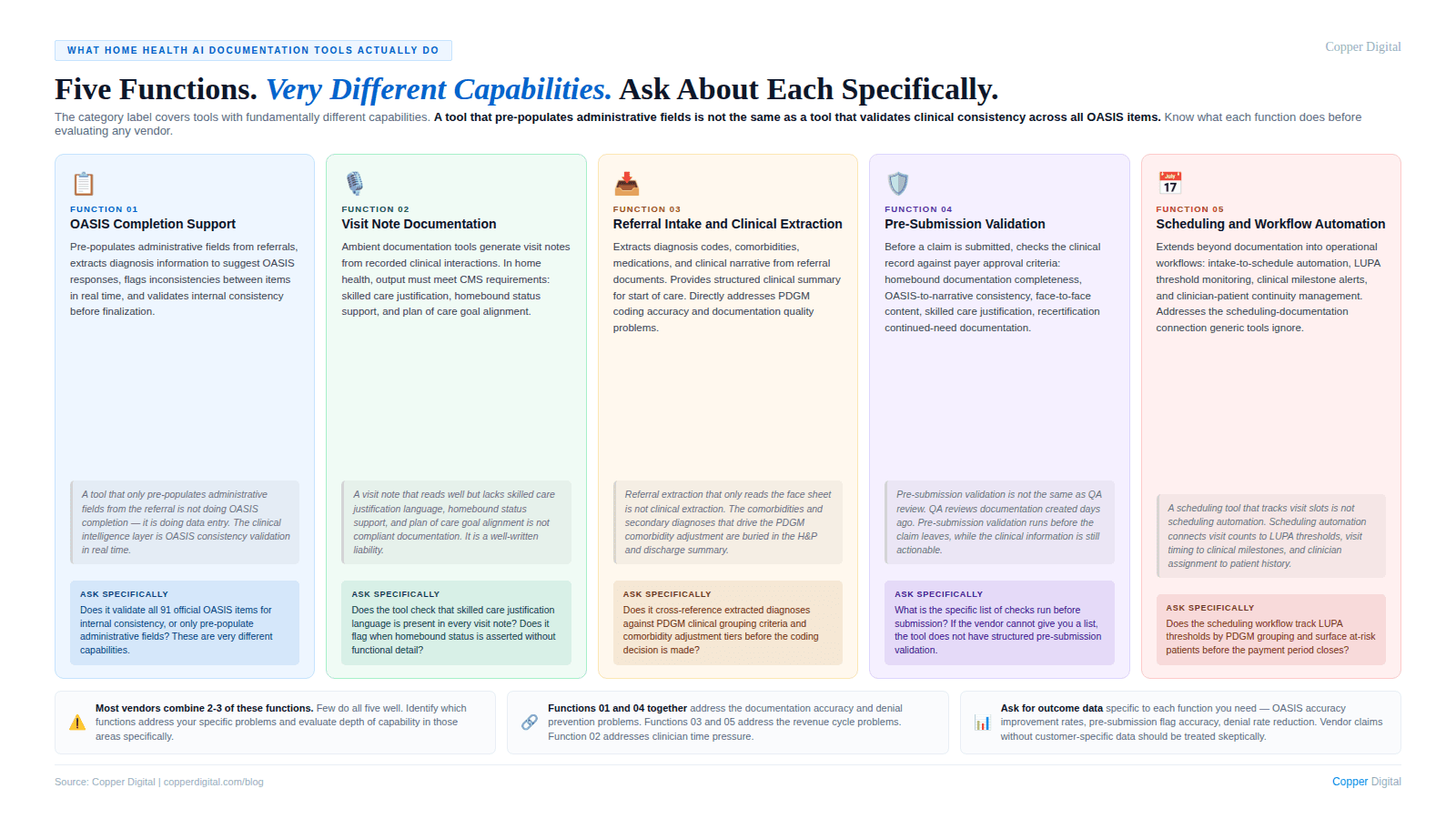
EMR systems are record-keeping platforms. They store the patient record, manage the care plan, and handle billing workflows. They capture what the clinician enters. They do not guide clinicians toward accurate, complete, audit-ready documentation.
Ambient scribe and AI documentation assistants use voice capture or AI assistance to reduce documentation effort. They primarily address documentation time. Whether they improve documentation quality depends on whether they incorporate the clinical logic of OASIS requirements and home health coverage criteria.
OASIS automation and compliance tools focus specifically on OASIS accuracy: automating portions from referral documents, checking the completed OASIS for internal consistency, or flagging documentation gaps before submission.
Workflow and intake automation focuses on referral intake, prior authorization, scheduling, and billing workflow management. Primarily aimed at operational efficiency, though intake automation that surfaces the right clinical information before the start of care visit has direct documentation quality implications.
Revenue cycle management tools address the billing side: claim scrubbing, denial management, and appeals workflow. They are intervention point 3 in the denial cycle. Necessary, but they do not address the documentation root cause.
Many vendors offer tools that span multiple categories and use the same language regardless of what their tool actually does. Before evaluating any vendor, identify which category of problem you are primarily trying to solve, then evaluate whether the tool is actually designed to solve it.
The Eight Capabilities That Matter Most
Evaluate every vendor against this list. These are the capabilities that produce the most measurable impact on documentation quality, clinical productivity, and revenue protection.
1. Referral intake and clinical data extraction
The documentation problem begins at referral. A 30 to 60 page hospital discharge packet contains the clinical information that should inform the OASIS, the primary diagnosis selection, the comorbidity coding, and the care plan. If that information is not extracted and surfaced before the start of care visit, the clinician is starting from an incomplete picture. See how this connects to PDGM diagnosis sequencing accuracy.
What to look for: Can the tool extract diagnosis codes, active conditions, and medications from referral documents in multiple formats? Does it surface this in a format that informs the coding decision, or does it just store documents?
2. Pre-visit clinical briefing
A nurse walking into a visit with a structured summary of the patient's prior clinical picture documents differently than a nurse reviewing a cold chart. Pre-visit briefing is the workflow intervention that most directly supports both documentation accuracy and clinician efficiency. This is the fundamental design failure of most EMR workflows that Kathy Duckett described.
What to look for: Does the tool generate a visit-specific briefing from the patient's existing record? Is it formatted for quick consumption before the visit, not a dump of the full chart?
3. Real-time documentation support
Documentation completed during or immediately after the visit is more accurate than documentation from memory hours later. Tools that support real-time documentation address the single most significant driver of OASIS inaccuracy.
What to look for: Does the tool work in a mobile environment with limited connectivity? Does it support voice input or modalities that reduce documentation friction during the visit?
4. OASIS-to-narrative consistency checking
Internal inconsistencies between OASIS scores and visit narrative documentation generate ADR flags algorithmically. A tool that checks for these inconsistencies before submission is one of the highest-value capabilities in the category.
What to look for: Does the tool check OASIS scores against visit narrative before submission? Does it identify specific inconsistencies with enough clinical detail to guide correction?
5. Homebound status and skilled care documentation prompts
The two most common denial triggers in home health are homebound status stated without demonstration and skilled care documented as tasks rather than clinical judgment. A tool that prompts clinicians toward the specific content that satisfies these requirements has direct denial prevention value. See our posts on audit defense and face-to-face documentation.
What to look for: Does the tool incorporate specific CMS requirements for homebound documentation and skilled care justification? Is it built for Medicare home health criteria, or is it a generic clinical tool adapted for home health?
6. PDGM coding support
Primary diagnosis selection and secondary diagnosis coding determine the HHRG assignment that sets reimbursement. PDGM sequencing errors are systematic and consistently undercoded. A tool that validates primary diagnosis selection and extracts qualifying comorbidities has direct revenue impact.
What to look for: Does the tool understand PDGM clinical grouping logic? Does it flag primary diagnosis inconsistencies with the OASIS functional picture? Does it surface qualifying comorbidities from the referral?
7. Recertification and milestone management
Recertification documentation failures and missed milestones are predictable, schedulable problems. A tool that tracks windows, surfaces the prior period's clinical trajectory, and validates continued-need documentation before submission addresses both the compliance risk and the documentation gap. See our post on recertification documentation.
What to look for: Does the tool track recertification deadlines proactively? Does it synthesize prior period visit notes into a clinical trajectory summary for the clinician?
8. EMR integration depth
A documentation tool that requires clinicians to maintain two parallel workflows will not be adopted and will not produce value.
What to look for: Does the tool write back to the EMR or require manual transfer? What EMRs does it integrate with, and what data flows bidirectionally? Is the integration production-tested with your specific EMR version?
Questions to Ask Every Vendor
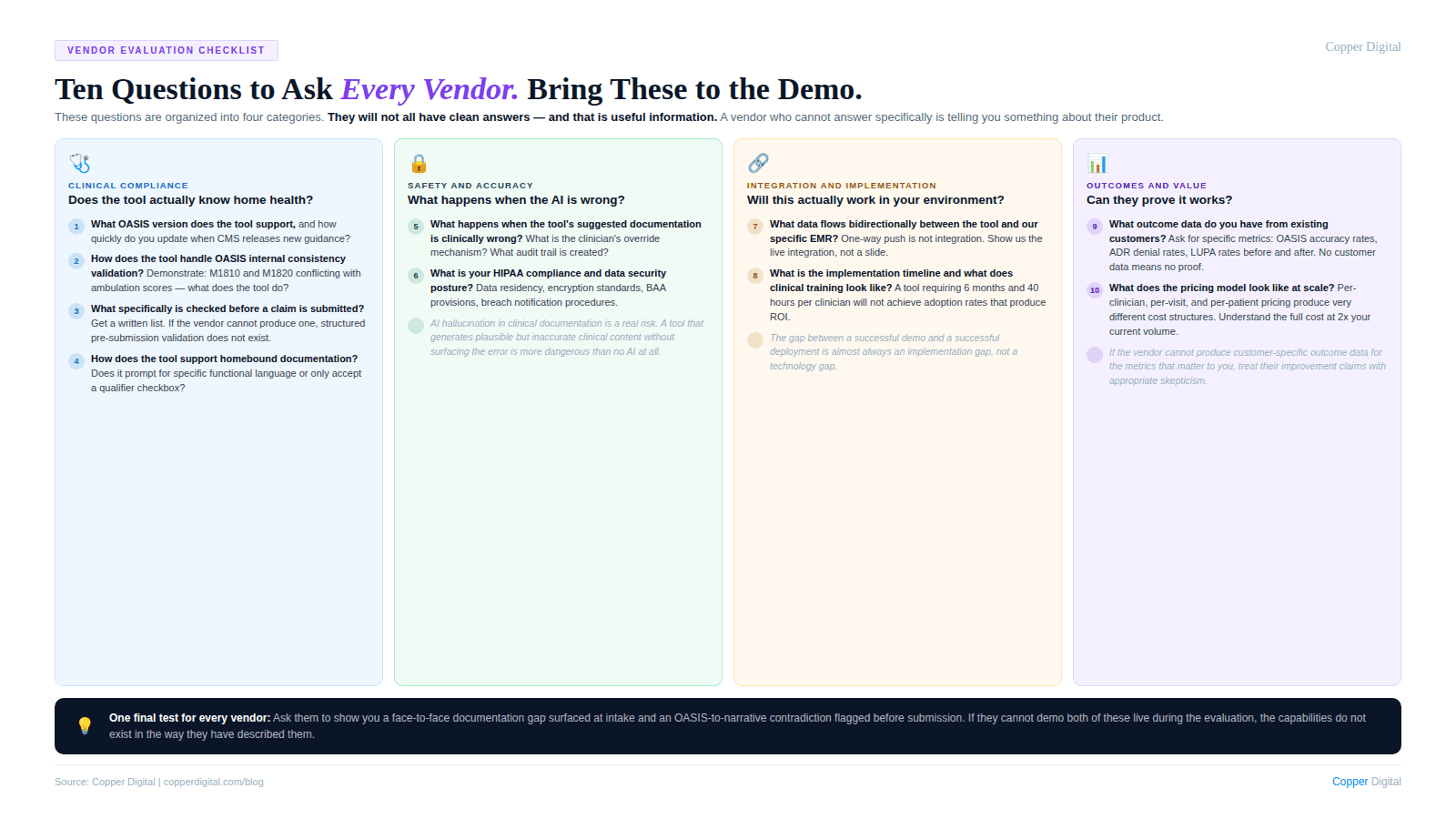
Clinical logic
Is your OASIS logic built on current CMS guidance, and how do you update it when guidance changes? Who on your team is responsible for keeping clinical content current?
Can you show me specifically how your tool handles homebound status documentation prompting and what clinical detail it prompts for?
Does your tool distinguish between the different OASIS time-reference parameters in its prompting logic?
How does your tool handle documentation requirements for homebound status across Medicare, Medicare Advantage, and commercial payers?
Revenue impact
Does your tool support PDGM primary diagnosis validation against OASIS functional data? Can you show me an example?
Can you show me documented evidence from existing customers of denial rate improvement attributable to your tool? Not aggregate stats, specific agency data with before-and-after comparison.
How does your tool extract secondary diagnoses from referral documents for the comorbidity adjustment?
Implementation and adoption
What is the typical time from contract to go-live for an agency our size, and what are the most common implementation delays?
What does clinician training look like and what adoption rates do you see in the first 90 days?
What EMR do we use, and can we speak with a reference customer using the same EMR?
Vendor stability
. How many home health agencies are currently live on your platform, and what is your customer retention rate?
. How were customers updated for the 2025 all-payer OASIS requirement change? What is your update cadence for clinical content when CMS guidance changes?
Red Flags to Watch For
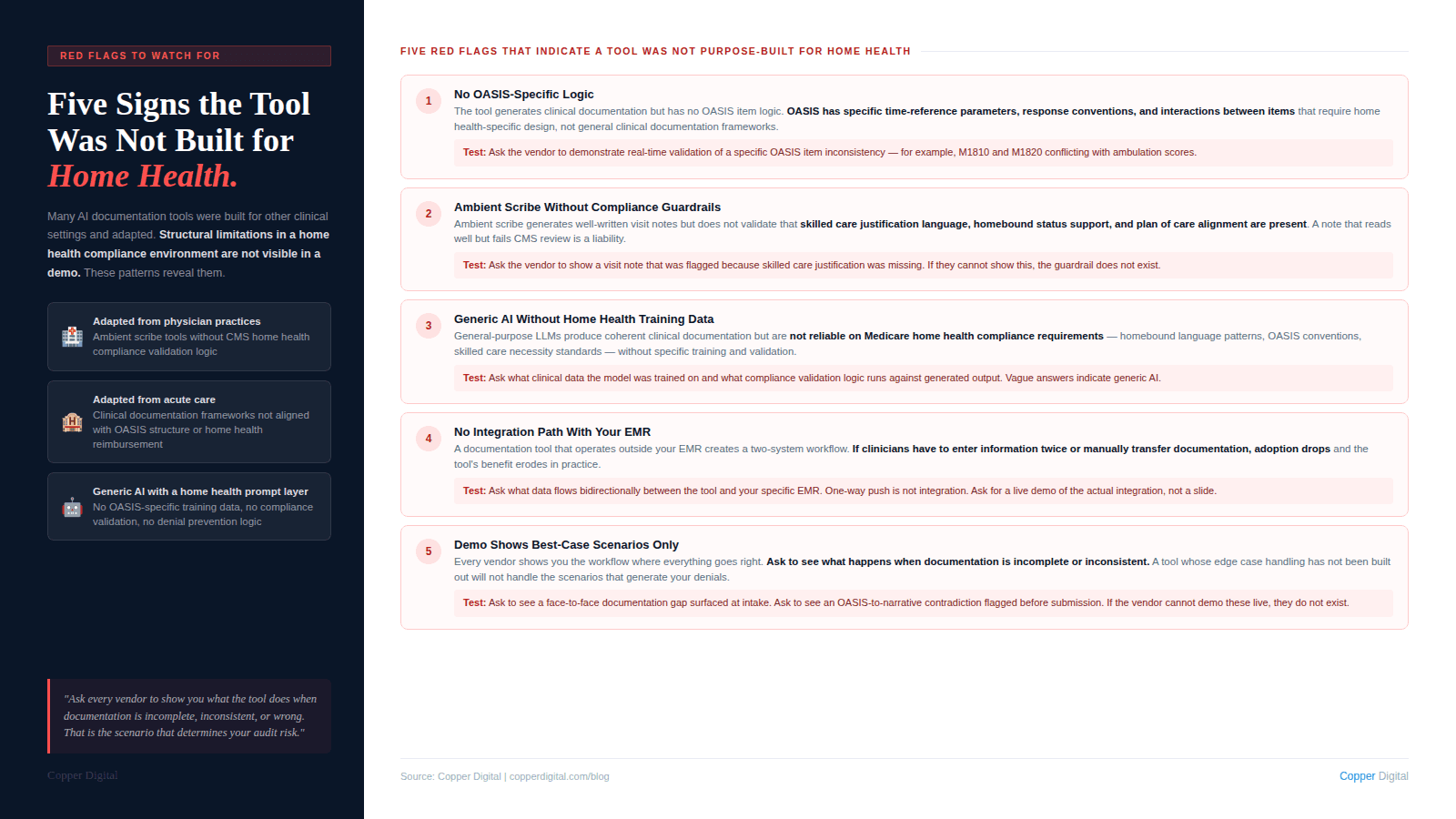
ROI claims without customer-specific evidence. Ask for anonymized before-and-after data from agencies comparable to yours. If they cannot produce it, the claims are not grounded.
Generic AI documentation with home health branding. Many ambient scribe tools designed for physician practices have been rebranded for home health. They may reduce documentation time. They are unlikely to address OASIS accuracy requirements, homebound documentation standards, and PDGM coding logic.
No clinical advisory structure. If the vendor cannot identify who is responsible for clinical content and how it is kept current, the tool will drift out of compliance as guidance changes.
Vague integration claims. Ask for the specific integration architecture: what data flows in, what flows out, what requires manual transfer, and what breaks when the EMR releases an update.
No clinical workflow in the demo. A demo that shows the interface without walking through a full clinical workflow from referral intake through recertification is showing you a product without showing you whether it fits your workflow.
Resistance to a structured pilot. Any credible vendor will support a pilot with defined scope, defined timeframe, and agreed-upon success metrics. A vendor who resists a structured pilot is not confident in what the pilot will show.
How to Structure the Evaluation
. Define your primary problem and success criteria before talking to any vendor. Success criteria defined before the evaluation cannot be moved by a compelling demo.
. Run a structured demo with a consistent set of scenarios. Give every vendor the same clinical scenarios: a complex start of care visit, a recertification workflow, a denial prevention check. Consistent scenarios let you compare vendors on the same dimensions.
. Talk to reference customers using your EMR who have been live for at least 12 months. The 12-month threshold matters because the first 90 days are managed by the vendor's customer success team. What happens after that tells you more about the product.
. Run a pilot before full commitment. 10 to 20 clinicians across 30 to 60 days will surface integration issues, adoption challenges, and actual documentation quality impact before you are fully committed.
The most expensive documentation software mistake is not paying too much for a tool. It is paying for a tool that solves the wrong problem, or one designed for a different clinical context and adapted for home health without the underlying clinical logic to support it. |
Where Copper Digital Fits
Copper Digital is an AI documentation platform built specifically for home health. Our core capabilities are clinical data extraction from referral documents at intake, pre-visit clinical briefing for field clinicians, real-time OASIS documentation support and consistency checking, PDGM primary diagnosis validation and comorbidity extraction, and pre-submission documentation validation against the criteria that drive ADR denials.
We are not an EMR. We integrate with your existing EMR. We are not an ambient scribe designed for physician practices. We are built specifically for the OASIS assessment workflow, Medicare home health eligibility requirements, and the PDGM payment model.
Evaluate us against every criterion in this guide. Ask us the questions above. Ask for reference customers using your EMR. Ask us to walk through a full clinical workflow in the demo. Request a demo here and tell us which problem you are trying to solve.
Ready to evaluate Copper Digital against your specific documentation and revenue challenges? Request a demo and tell us which problem you are trying to solve. We will walk through your workflows, your current EMR, and the documentation gaps that are costing you revenue. |
Related Reading